How to practice pronunciation with ChatGPT
On Playphrase.me, you hear different people say familiar words and expressions. The next step is to say those phrases yourself and find out what needs work. ChatGPT can say a phrase for you, listen to your attempt, explain an error, and help you repeat the difficult part.
The site's Copy practice prompt button prepares this practice for you. Here, a prompt means a ready-to-use request for ChatGPT: it contains your lesson phrases and instructions for checking them. You do not have to write the instructions yourself or rebuild the phrase list from memory.
This follows the listening stage of the Krashen-based study cycle: you practice saying the same material you have just heard.
Collect your material and open the lesson window
Study on Playphrase.me on a computer as usual. Once playback begins for a word or expression you selected, it is added to the current lesson. Several scenes with the same phrase leave just one entry in the list. Keep listening and move on to other expressions whenever you want; the site collects the material as you study.
After listening, click the clipboard icon beside the search bar. Its tooltip says Copy practice prompt. The prompt is copied immediately, and a window opens with your lesson material.
Understand the date, lesson number, and phrase list
A lesson in this window is a collection of words and phrases you have listened to. Use the date and lesson number to choose which collection to send to ChatGPT now.
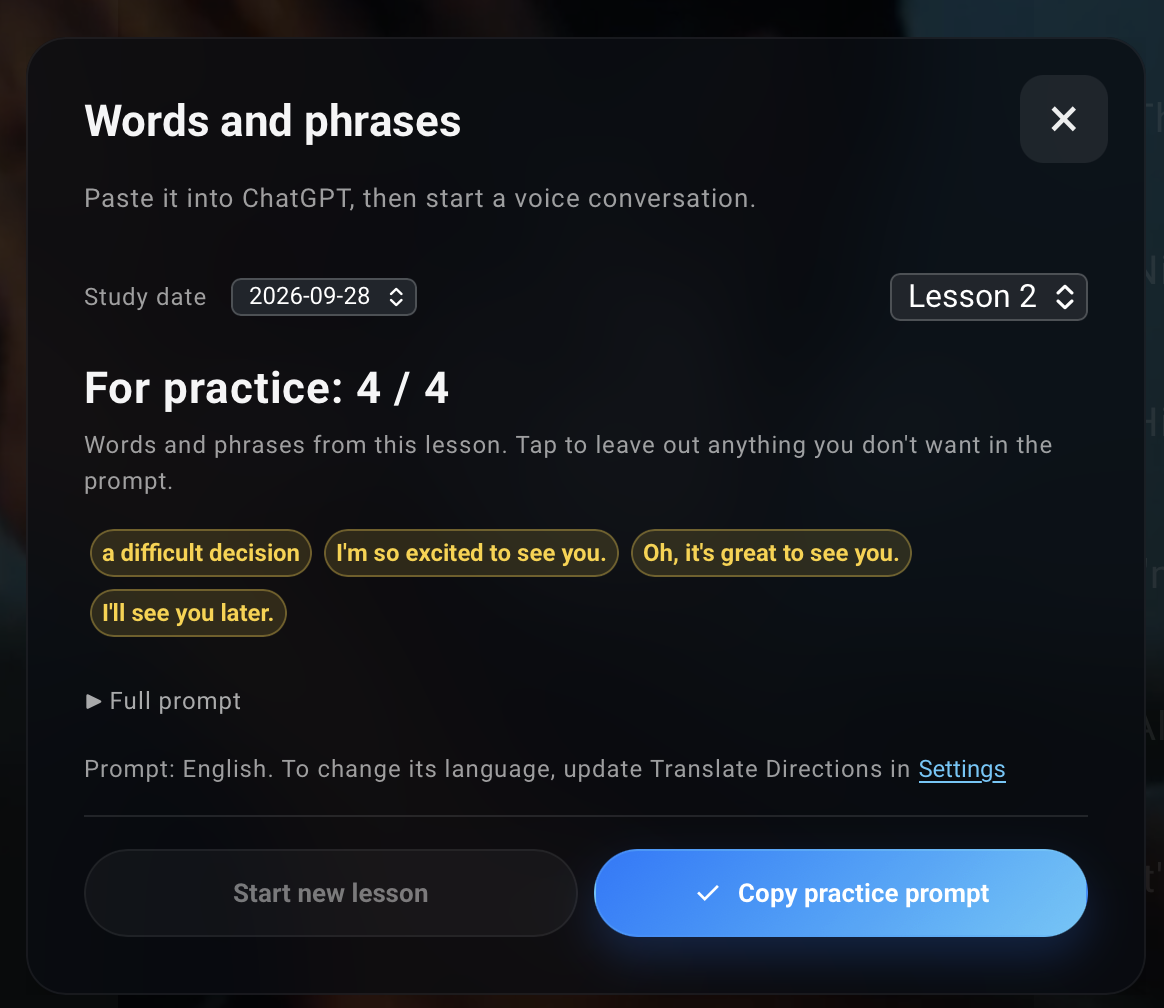
- Study date selects the day you listened to the material. For example, you can return to yesterday's phrases and practice their pronunciation today.
- Lesson selects a separate session from that day. If you study more than once in a day, you can keep each session's material separate and choose the lesson you want.
- For practice shows how many expressions are included in the prompt. The screenshot shows 4 / 4: all four are selected. Click an expression you do not want to practice now. It becomes translucent and is left out of the next copy of the prompt. Click it again to include it.
- Start new lesson creates an empty collection for your next session. Use it when you want to collect new material separately. The previous lesson stays available through the date and lesson selectors.
Start new lesson is available when you are viewing today's latest lesson and it already contains at least one expression. If you are viewing an older session, choose today's date and the latest lesson number. If that lesson is empty, you can start adding material to it; there is no need to create another one.
If the list is empty, choose a word or phrase on the site and start listening. You will then have material to send to ChatGPT.
Copy your selection
The prompt language appears at the bottom of the window. Before copying, choose the translation language you want in Playphrase.me settings. ChatGPT will use it for explanations while you practice English pronunciation. The Settings button in this window opens the settings; choose the translation language under Translate Directions.
Expand Full prompt to read the instructions and expressions you will send to ChatGPT. The practice order is already written: a brief meaning check, a spoken example, your attempt aloud, and another attempt after an explanation of the error.
Once you have chosen the language, date, lesson, and phrases, click Copy practice prompt again. This copies the request with your selected settings and material. A check mark on the button confirms the copy.
Turn on Voice and say the phrases aloud
Paste the prompt into ChatGPT and send it. In the same chat, turn on Voice and say "Let's start." The prepared prompt is enough for this practice; you do not need to install a skill.
ChatGPT works through one phrase at a time. First, it says the phrase and asks you to translate it or briefly explain its meaning in your own words. This checks that you understand the expression you are about to say. If the list contains a single word, ChatGPT puts it into an everyday phrase.
Then work on pronunciation: listen to the example and repeat it aloud. If ChatGPT hears an error, the prompt asks it to pick one difficult part, say it separately, explain how to correct it, and wait for another attempt. You try again before moving on.
If the whole phrase is hard to say, ChatGPT helps you build it from the end. For example: decision → difficult decision → a difficult decision. It says the final short part and waits for you to repeat it. Then it adds the preceding part and waits again. Finally, you say the whole expression at a normal pace. This help is used only when something is difficult.
ChatGPT then moves to the next phrases and returns to the difficult ones. At the end, it briefly lists what still needs work in meaning and pronunciation, based on your answers. To practice the same lesson again, select it in the window on the site and copy the prompt again.
Pronunciation practice can be part of a complete study cycle: choose new words, find expressions that use them, listen to different scenes, say the phrases yourself, and repeat what still feels difficult. The full approach is explained in "How to learn English with Krashen's method on Playphrase.me".